Study Screener vs Rayyan: feature comparison for systematic review screening
A practical comparison of Rayyan and Study Screener for title/abstract screening aligned with PRISMA 2020 and Cochrane study-selection guidance: imports, blinding, AI paths, exports, and honest gaps.
Purpose. Help you decide whether Study Screener fits your title/abstract screening step—not to declare a universal “winner.” Rayyan is widely used for collaborative screening; we compare observable product behavior (May 2026 codebase) and flag gaps on both sides. Method expectations are aligned with PRISMA 2020 and the Cochrane Handbook, Ch. 4.
Not covered here: Full-text PDF screening inside either tool (chekout our dedicated tool for full text PDF analysis Evidence Table Builder), risk-of-bias modules, or live pricing tables (check each vendor’s site).
Quick answer (Rayyan features vs what Study Screener does)
If you need a fast read: Rayyan offers in‑app deduplication, blinded dual screening, conflict review with Blind Mode off, and flexible RIS/CSV/BibTeX exports. Study Screener supports blinded dual screening with a disagreement inbox and an owner/arbiter resolution step after opening; imports accept RIS and PubMed .txt, and the backend jointly deduplicates combined uploads (DOI or normalized title+year) before storing studies. AI assistance in Study Screener runs as a separate batch job (not inline re‑ranking). Both tools export what you need for PRISMA reporting; Study Screener also ships a standalone PRISMA 2020 diagram builder. See proofs and sources below.
Verified feature snapshot (with sources)
| Screening feature | Rayyan (source) | Study Screener (verified) |
|---|---|---|
| Import formats | EndNote .enw, RIS .ris, BibTeX .bib, CSV .csv, PubMed NBIB/XML, CIW, PDF Rayyan import formats | RIS .ris and PubMed/MEDLINE .txt accepted in UI and direct upload |
| Deduplication | Detect + resolve in‑app; optional Auto‑Resolver Rayyan duplicates Auto‑Resolver | Combined‑file dedup on upload (DOI or normalized title+year); response includes duplicates_removed |
| Blinded dual screening | “Blind Mode” on by default; turn off to review conflicts Rayyan blind mode | Projects start blinded; owner can open or auto‑unblind when all complete |
| Conflict handling | Resolve with Blind Mode off; owner controls toggle Rayyan conflicts | Disagreement inbox after opening; owner/arbiter resolves via RPC record_decision_resolutions — see team how‑to |
| Exports | RefMan/RIS, BibTeX, EndNote ENW, CSV; per‑stage; include decisions/labels Rayyan export | Manual: decision‑filtered RIS and screening‑log CSV; conflicts CSV post‑open; project rate limits (Free 5/24h, AI 25/24h) |
| AI assistance | Relevance ranking/predictions in screening view | Separate batch LLM job; results include label + confidence; not inline re‑ranking |
At a glance
| Area | Rayyan (typical use) | Study Screener (verified) |
|---|---|---|
| Core job | Collaborative title/abstract screening | Same + separate AI batch triage job |
| Import | RIS and related flows; in‑app deduplication often used | RIS / PubMed .txt; combined‑file dedup on import |
| Blinded dual review | Supported | Supported (default blinded on create) |
| AI | Suggestions / prioritization while you screen | Separate /ai-screening LLM job—not inline on manual dashboard |
| PRISMA diagram | Users often assemble externally or via exports | /prisma-diagram builder + AI job modal |
| Mobile app | Rayyan markets mobile access | Responsive web only |
| Migration from other tool | Export RIS from Rayyan → import here | No native .rayyan import |
Rayyan in one paragraph
Rayyan is a web and mobile environment built for multi-reviewer title/abstract screening, with deduplication and optional machine-learning assistance while you work through the queue. Teams often choose it for low-friction collaboration. Feature sets and plans change over time—confirm current capabilities on rayyan.ai before you commit.
Study Screener in one paragraph (from the product)
Study Screener focuses on PRISMA-friendly documentation for screening (PRISMA 2020): blinded manual decisions per Cochrane norms, CSV/RIS exports with decision logs, optional batch AI classification with confidence scores, and a PRISMA 2020 diagram builder. Title/abstract screening is in-app; full-text PDF review is out of scope—plan Zotero, Covidence, or your library workflow for PDFs.
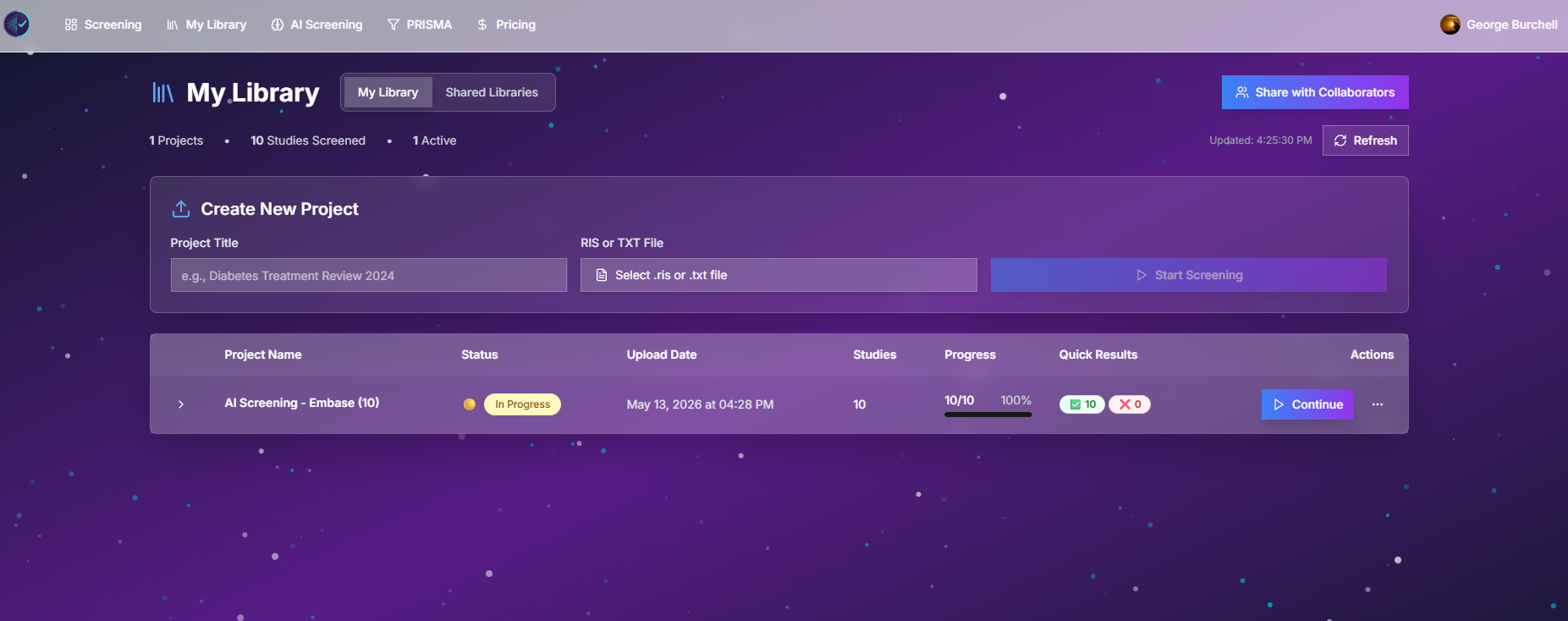
Figure: Project library—owned and shared reviews, export entry points.
Feature comparison (verified May 2026)
Imports and deduplication
| Rayyan | Study Screener | |
|---|---|---|
| RIS import | Yes | Yes (/api/upload, AI upload) |
| EndNote XML / CSV native | Often via conversion | Convert to RIS first (Zotero, EndNote). Steps: How to import from Zotero, EndNote, or a RIS file |
| Duplicates removed on import | Rayyan UI supports detect/resolve | Yes — combined upload dedup (DOI or title+year); returns duplicatesRemoved |
| Max upload (our stack) | (Rayyan limits vary) | 50 MB direct upload |
Workflow implication: If you rely on Rayyan dedupe, reproduce it in Zotero/Mendeley/Rayyan export before importing to Study Screener, and record duplicate counts for your PRISMA 2020 flow diagram.
Manual screening UX
| Rayyan | Study Screener | |
|---|---|---|
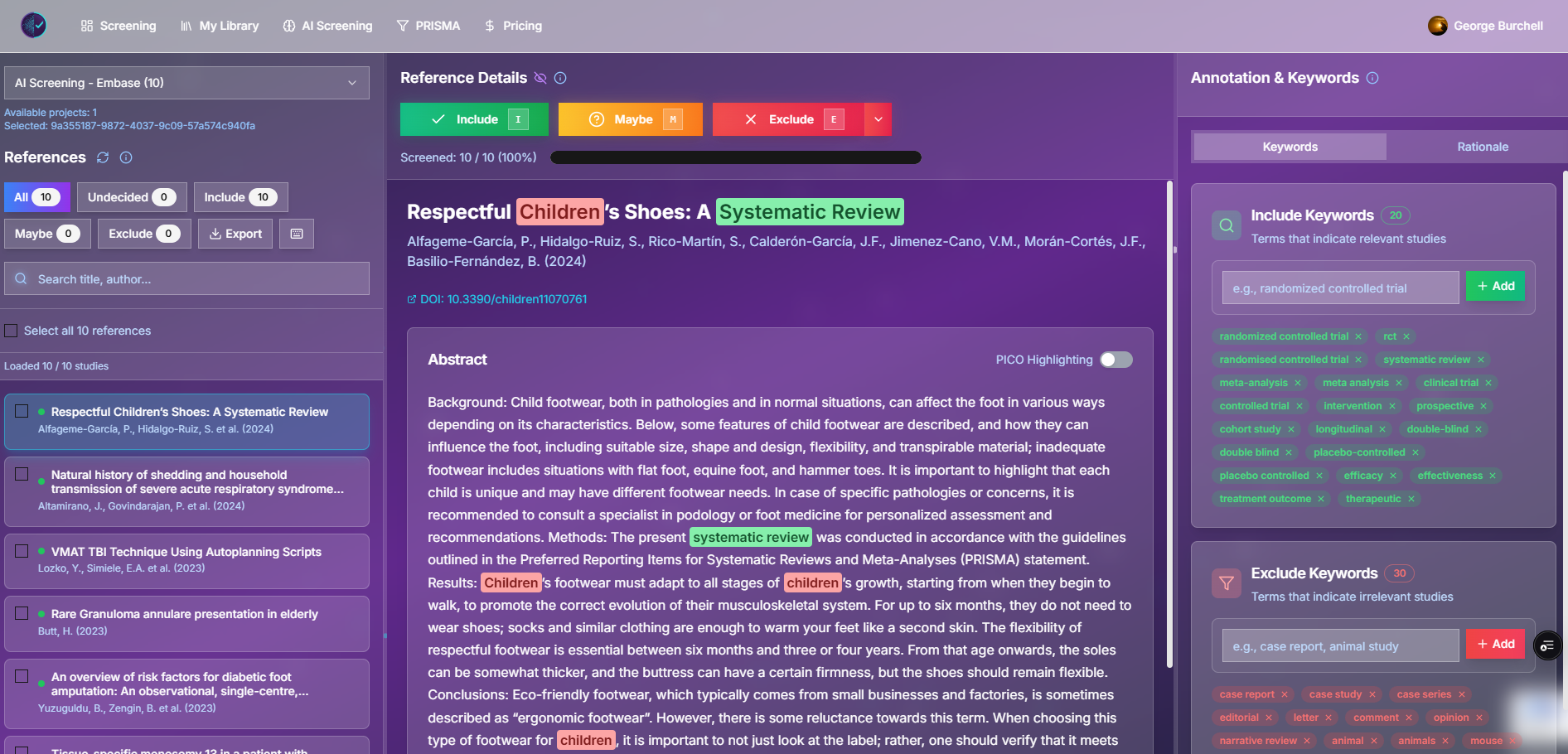
| Decisions | Include / exclude (and extensions by version) | Include / Maybe / Exclude + notes |
| Keyboard shortcuts | Yes | I / M / E on dashboard |
| PICO highlighting | (varies) | User-defined PICO terms on abstract |
| Bulk actions | (varies) | Bulk decisions API |
| Blinding | Available | Default on; owner can unblind |
Collaboration and conflicts — see the team how‑to
| Rayyan | Study Screener | |
|---|---|---|
| Invite reviewers | Email-based teams | Email invite (owner-only API) |
| Conflict detection | Built into Rayyan UI | Team results + hasConflict when unblinded |
| Dedicated conflict‑resolve | Rayyan UI flow | Yes — owner/arbiter resolves via RPC after opening (record_decision_resolutions) |
| In-app messaging | — | Not implemented (invitation email only) |
| Per-study assignment | — | Not implemented (all reviewers share pool) |
Honest note: Cochrane expects disagreements to be resolved and documented. If your protocol requires formal third-reviewer arbitration with signed consensus notes, test whether our export + notes fields meet your audit needs in a pilot.
AI-assisted screening
| Rayyan | Study Screener | |
|---|---|---|
| Model | Prioritization / suggestions during manual queue | Batch LLM classify all records in a separate job |
| Training from your labels | Incremental while screening | Criteria text + job rerun (credits apply) |
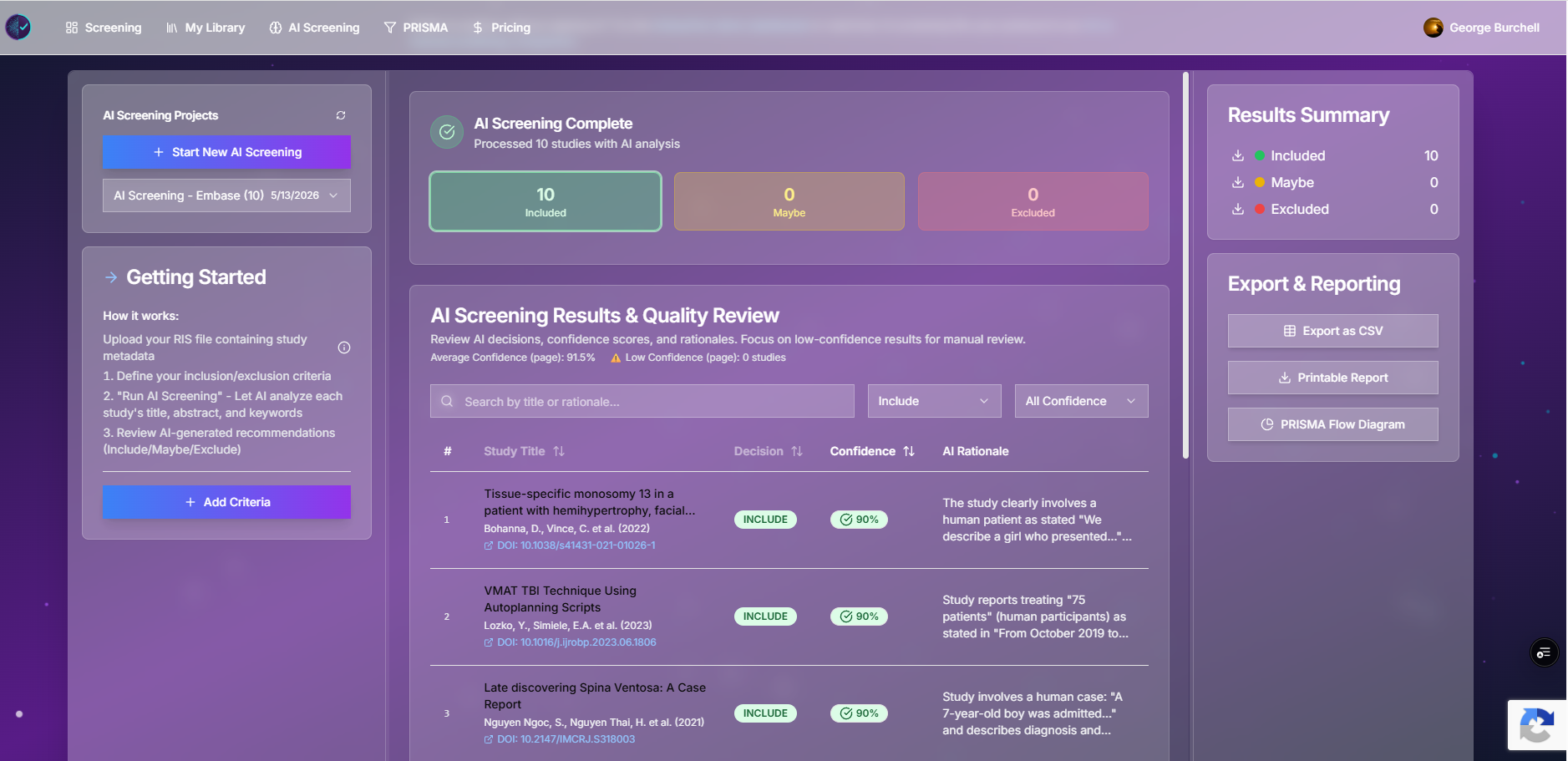
| Confidence scores | (feature-dependent) | Per-record confidence + rationale in AI results |
See AI vs manual screening for how we describe batch AI triage vs manual dual review under PRISMA 2020.
Exports and PRISMA
| Rayyan | Study Screener | |
|---|---|---|
| Decision export | CSV / reference formats (plan-dependent) | CSV decision log, RIS by decision (manual & AI) |
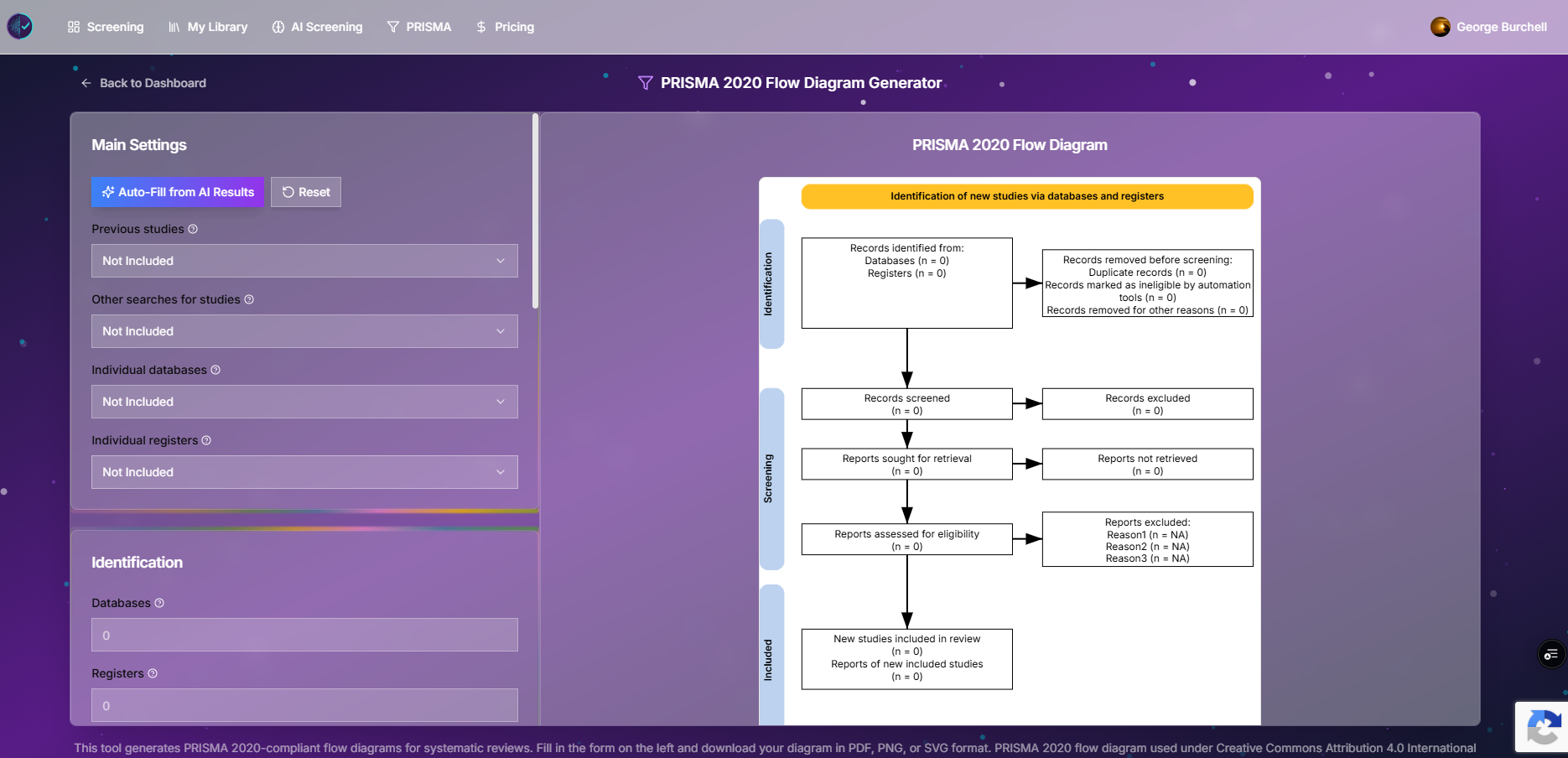
| PRISMA flow diagram | Often manual / external tools | In-app PRISMA 2020 builder; AI job can pre-fill counts (verify dedupe fields) |
| Diagram formats | — | PNG / SVG (print to PDF from browser if needed) |
| Export rate limits | (Rayyan plan) | Free: 5 exports / project / 24h; AI plan: 25 (DB get_plan_policy) |
Plans and scale (Study Screener code, not marketing PDFs)
| Plan | Owned projects | Studies / project |
|---|---|---|
| Free | 1 | 10,000 |
| AI screening subscription | 5 | 20,000 |
Rayyan’s free/paid tiers change over time—confirm on rayyan.ai before budgeting.
When Rayyan is the better fit
- You want Rayyan’s deduplication and mobile workflow unchanged.
- Team is already trained and journal timeline does not justify migration.
- You need Rayyan-specific integrations your institution pays for.
- Review is small (< ~1,000 records) and migration cost exceeds benefit.
When Study Screener is worth a pilot
- You want Maybe triage, PICO highlighting, and CSV decision logs tuned for PRISMA 2020 write-ups.
- You plan batch AI triage with exported rationales (separate from manual dual review).
- You want an integrated PRISMA 2020 diagram without redrawing boxes manually.
- You are starting a new review and can dedupe once upstream.
Migration workflow: Rayyan → Study Screener
No proprietary Rayyan import—use RIS, as we document in integrations.
| Step | Action |
|---|---|
| 1 | In Rayyan, export screened or unscreened set as RIS (include decisions if exporting for audit). |
| 2 | If you need a clean restart, export search set before decisions; otherwise export with labels and map them in a spreadsheet. |
| 3 | Deduplicate in Rayyan or your reference manager if needed; Study Screener also deduplicates combined uploads on import. |
| 4 | Create a Study Screener project → upload one combined RIS. |
| 5 | Re-invite reviewers; enable blinding per Cochrane dual-screening practice. |
| 6 | Pilot 50–100 records—compare Rayyan labels vs new decisions if continuing an in-flight review. |
| 7 | Export PRISMA counts from your dedupe log + screening exports. |
Decision mapping tip: Rayyan include/exclude may map to our Include/Exclude; uncertain Rayyan items → Maybe until resolved.
Try before you switch
- Demo dashboard — manual UI, no commitment.
- Import a small RIS — test blinding and exports on a past Rayyan export.
- AI screening — run 200 records; manually audit excludes.
References
- Page MJ, et al. PRISMA 2020 statement. BMJ 2021. https://doi.org/10.1136/bmj.n71
- Cochrane Handbook, Chapter 4 — Study selection. https://training.cochrane.org/handbook/current/chapter-04
- Rayyan Help: Duplicates. How to Detect and Manage Duplicates in Rayyan
- Rayyan Help: Auto‑Resolver. How to Use the Auto‑Resolver in Rayyan
- Rayyan Help: Blind Mode. How to Use Blind Mode in Rayyan
- Rayyan Help: Conflicts. How to Resolve Screening Conflicts in Rayyan
- Rayyan Help: Export. How to Export References and Decisions from Rayyan
- Rayyan Help: Import formats. Supported File Formats for Importing into Rayyan
Related reading
- How to import from Zotero, EndNote, or a RIS file
- Complete guide to RIS screening
- AI vs manual screening
- Paper screening: beginner’s step-by-step guide
- Blog scope and index
Comparison last reviewed against the Study Screener codebase, May 2026. Rayyan feature names change—verify on Rayyan for your subscription. Study-selection methods: PRISMA 2020 and the Cochrane Handbook.
